The Ultimate Guide to Proofreading Marks
If you work in the publishing, transcription, or editing fields, you’ll most likely recognize the standard proofreading marks that are used to annotate written works, but sometimes a symbol will pop up that makes you question everything you know.
Whether you’re a writer who is trying to translate proofreading marks into action or a professional proofreader who needs a refresher on common symbols, this article will de-mystify proofreading marks and their uses.
What Are Proofreading Marks?
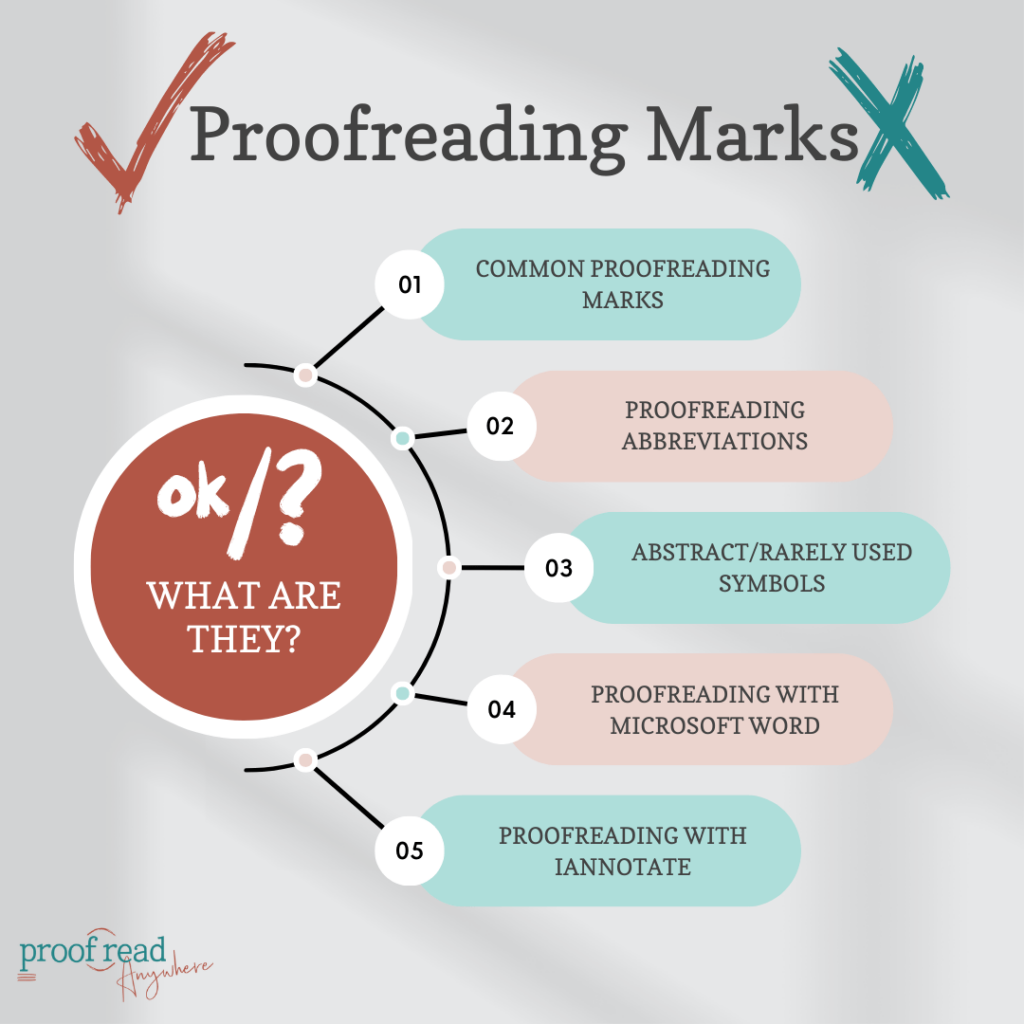
Physical copy proofreading uses marks in the left and right margins of the paper and within the double-spaced lines to show changes that need to be made. Today, most of these changes are tracked in a word processor or applied directly to the text.
Most proofreaders and editors use a standard system of marking to make the edits and suggestions easy to understand. Therefore, it’s important to understand what proofreading marks mean and how to translate them into tracked changes.
Here are common proofreading marks found in hard-copy annotation and notes on how they are used in digital annotation.
Common Proofreading Marks
Proofreaders’ marks, though standardized, may vary depending on the region. For example, different proofreading marks are used in different dialects — American English proofreading marks differ slightly from British English styles. However, there are several common marks commonly used by most organizations. The symbols are divided into operational signs, typographical signs, and punctuation marks.
Markings are typically made in the color red, with one mark — accompanied by an abbreviation — in the margin to explain the change and one in the exact place of the error. Some proofreaders annotate in green or another color to avoid making writers feel stressed at the sight of so many red “error” marks on their returned works.
Here’s a rundown of the most common proofreading marks and their most likely variations based on the APA 7th Edition and the Chicago Manual of Style 17th edition standards.
Operational Signs
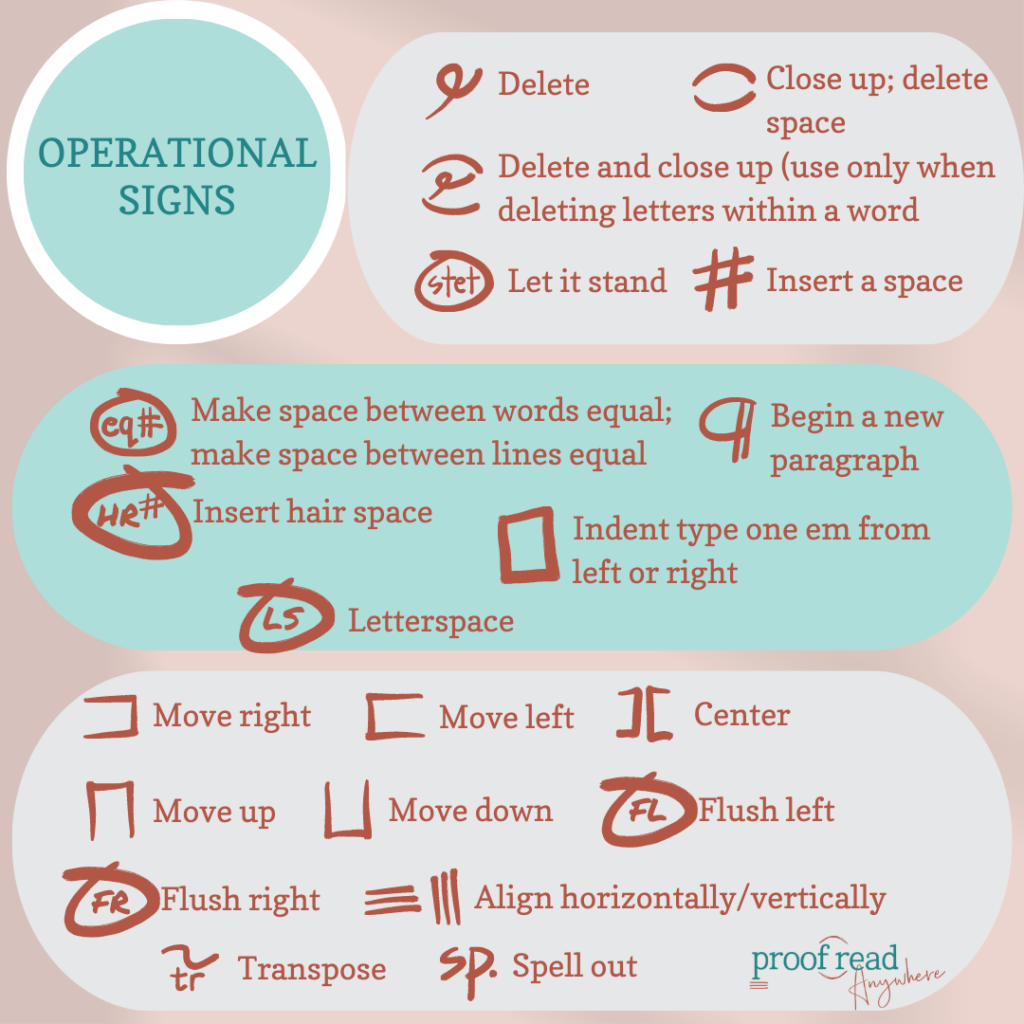
Operational proofreading marks or signs indicate changes in text organization. For example, moving a paragraph or splitting it, spelling out a word, or abbreviating.
This section doesn’t include punctuation changes, additions, or subtractions. Operational signs also don’t include text additions or subtractions or text style changes like italics or bolding.
Typographical Signs
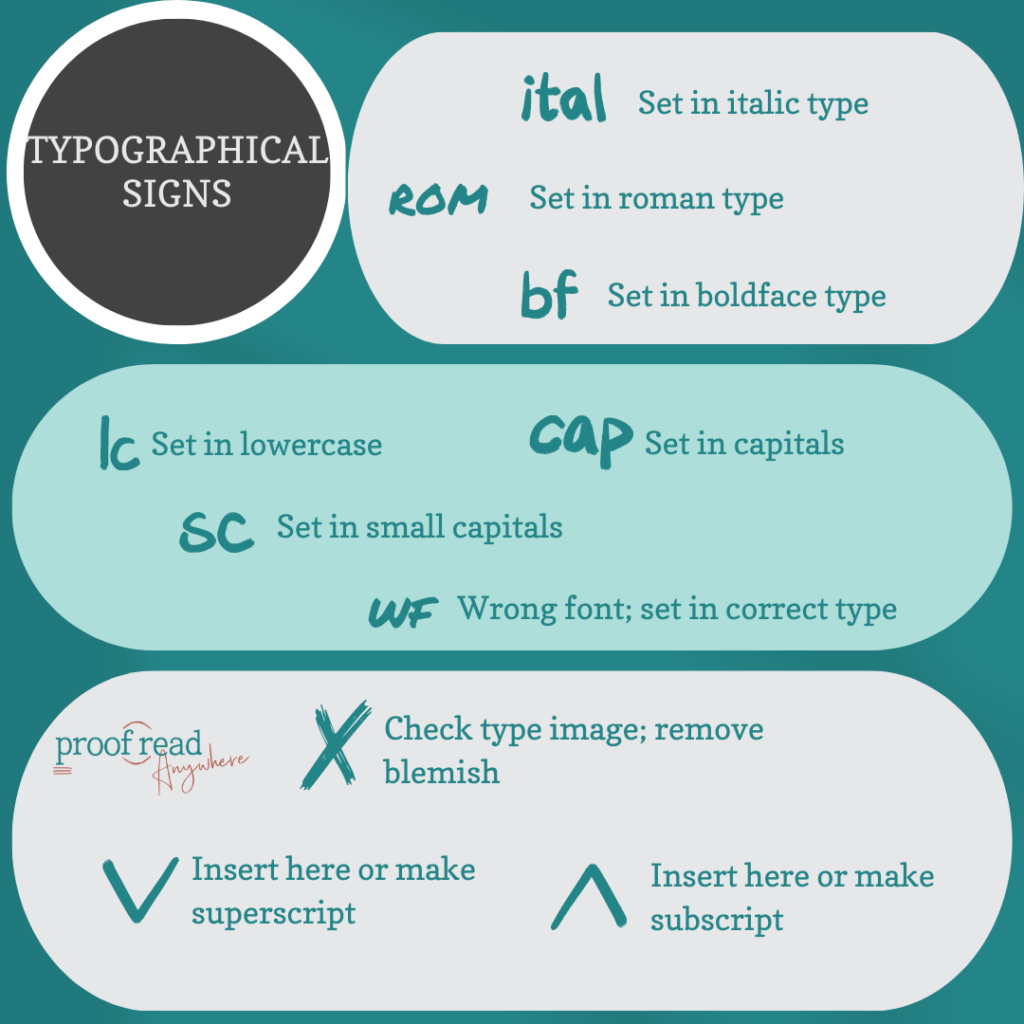
Typography signs refer to the words in the text. These signs mark the use of capitalization, lowercase letters, italics, bold, roman type, font, and misspellings.
Typography proofreading uses the caret to indicate the location of the change in the text, and usually an abbreviation in the margin of that line. Abbreviations give more information about the needed change, and the caret indicates where the change is needed.
Punctuation Marks
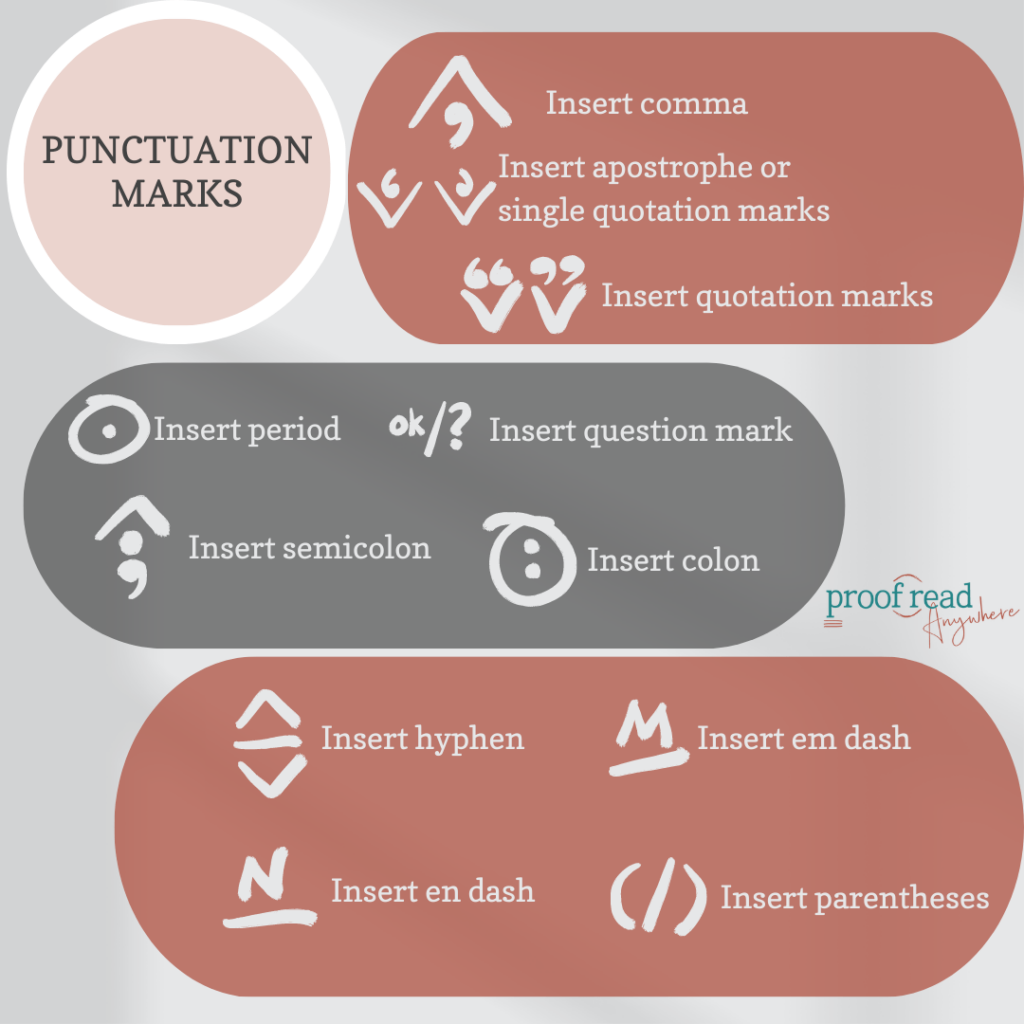
Punctuation proofreading marks are often described in the margin with a caret inside the text to show where the change needs to happen. The punctuation marks might also be located within the text and inside the caret with no marginal note.
Some common errors noted by proofreaders are the uses of the em dash, en dash, and hyphen, and inserting the proper mark digitally requires different typing operations depending on the word processor or platform used to write.
How to Use Em Dashes, En Dashes, and Hyphens:
- Insert em dash — The em dash is the longest dash, and it’s used similarly to the colon, comma, and parentheses to separate clauses. Word processors generally recognize a triple hyphen as an em dash.
- Insert en dash — The en dash is shorter than the hyphen and longer than the em dash. En dashes are used to denote ranges like dates, distances, or destinations. Word processors generally recognize a double hyphen as an en dash.
- Insert hyphen — The hyphen is a single dash that’s used to join words. Use a hyphen in compound modifiers when the modifier precedes the word it modifies.
Refer to the dictionary to confirm the use of a hyphen in words because word stylization can change. For example, trends in pop culture changed the word “base-ball” to closed compound “baseball” when the sport was popularized in the US.
Proofreading Abbreviations
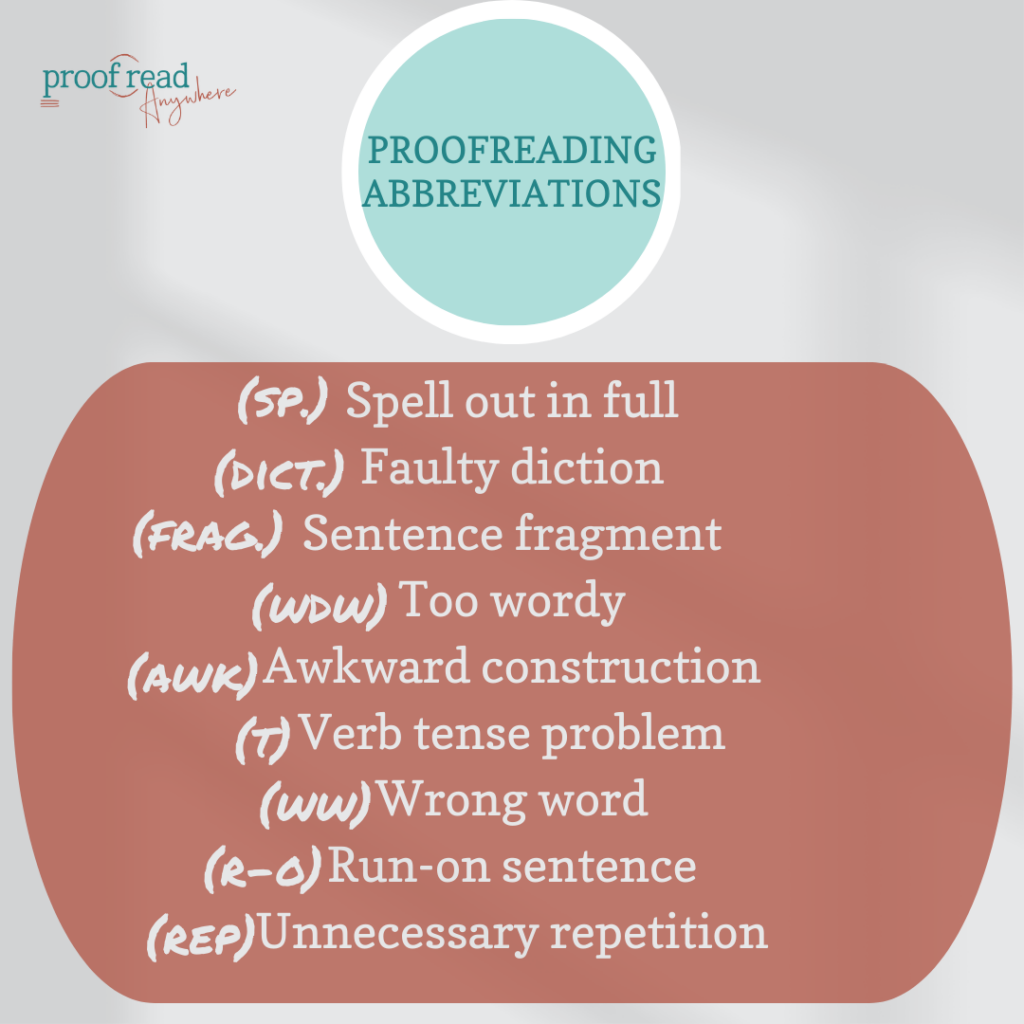
Proofreading abbreviations are common in hard-copy annotating, but they’re useful to annotate digitally too. Abbreviations are usually found in the hard-copy text’s margin, though digital proofreading abbreviations can be found either in the margin or in a comment.
Abbreviations commonly used in annotating include
- (sp): Spell out in full
- (dict): Faulty diction
- (wdw): Too wordy
- (awk): Awkward construction
- (t): Verb tense problem
- (ww): Wrong word
- (r-o Run-on sentence
- (rep): Unnecessary repetition
Abstract Symbols
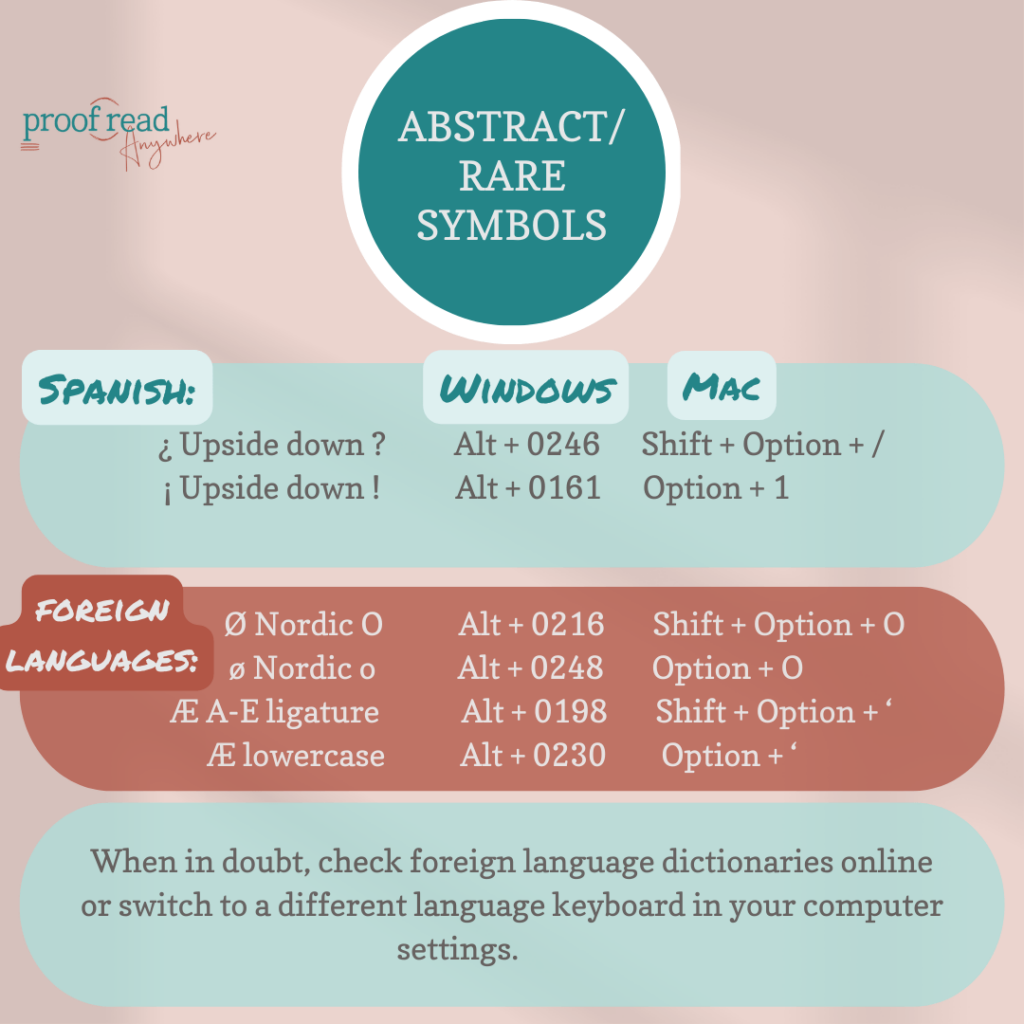
Special characters, or abstract symbols, are rarely used but may be needed in a text to formally denote currency, mathematical processes, legal ownership, and foreign letters or punctuation.
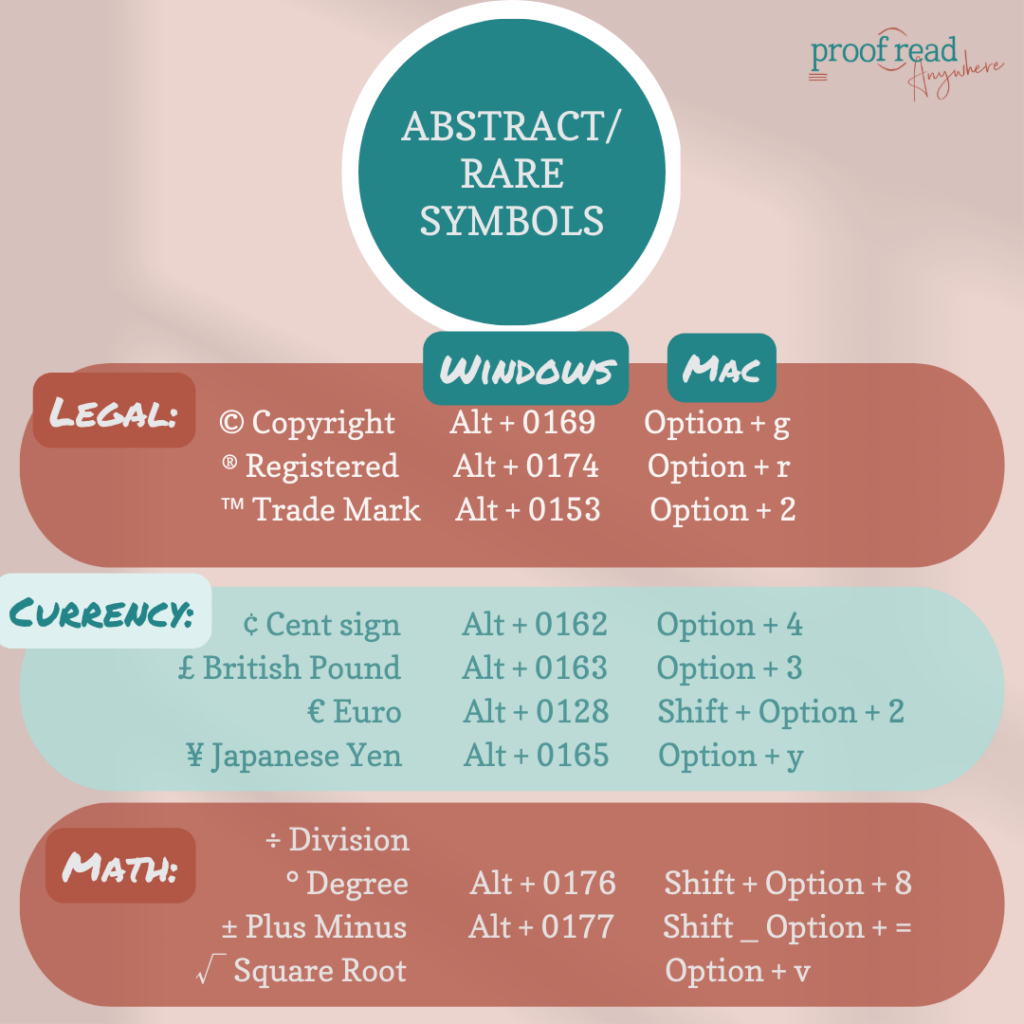
Word processors and other digital platforms include abstract symbols in the toolbar. You can also use the following keys to input these abstract symbols:
Legal Symbols
| Type | Windows | Mac |
| © Copyright | Alt + 0169 | Option + g |
| ® Registered | Alt + 0174 | Option + r |
| ™ Trade Mark | Alt + 0153 | Option + 2 |
Legal Symbols
Currency
| Type | Windows | Mac |
| ¢ Cent sign | Alt + 0162 | Option + 4 |
| £ British Pound | Alt + 0163 | Option + 3 |
| € Euro | Alt + 0128 | Shift + Option + 2 |
| ¥ Japanese Yen | Alt + 0165 | Option + y |
Currency Symbols
Math
| Type | Windows | Mac |
| ÷ Division | ||
| ° Degree | Alt + 0176 | Shift + Option + 8 |
| ± Plus Minus | Alt + 0177 | Shift _ Option + = |
| √ Square Root | Option + v |
Math Symbols
Foreign Languages
| Type | Windows | Mac |
| ¿ Upside down ? | Alt + 0246 | Shift + Option + / |
| ¡ Upside down ! | Alt + 0161 | Option + 1 |
| Ø Nordic O (capital) | Alt + 0216 | Shift + Option + O |
| ø (lowercase) | Alt + 0248 | Option + O |
| Æ A-E ligature (capital) | Alt + 0198 | Shift + Option + ‘ |
| Æ (lowercase) | Alt + 0230 | Option + ‘ |
Foreign Language Symbols
Lesser common abstract symbols and a detailed explanation are available from Google.
How to Use Proofreading Marks & Symbols with Different Software
If you’re working with a word processor like Google Docs, Microsoft Word, or iAnnotate, use the commenting and Track Changes systems to proofread the work. These systems involve an automatic feedback process that avoids in-text strikethroughs and font changes that call for manual attention.
To leave proofreading feedback that isn’t standardized, straightforward, or otherwise easily understood in a comment or tracked change, use the processor’s Insert Symbol function to insert feedback.
Here’s a basic way to create and use proofreading symbols on Microsoft Word and iAnnotate.
Proofreading Marks in Microsoft Word
Luckily for Microsoft Word users, proofreading on a Mac or PC works the same. Proofreaders don’t need to use traditional proofreading marks on Microsoft Word due to the brilliance of the “Track Changes” feature. This feature allows all users to see suggested edits and changes. The user can then accept or reject the suggestions.
To turn on Track Changes, click on the Review tab, then toggle the switch to turn on Track Changes. You can also find the Tools dropdown menu, then select Track Changes. Choose Highlight Changes for more detailed proofing preferences — like color, spacing, and comment balloon style.
After proofreading, the owner can click the checkmark on the suggestion balloon to apply an edit suggestion, or the X ignores the suggestion and keeps the original text.
You can also go to the Review Pane for a list of overall suggested changes.
You can also save all of your edit versions in one document by clicking Protection < Document, and you can add the optional password to control access.
If you don’t like the suggestion bubbles, a good way to add suggestions is in a comment at the end of the text.
To see a full walk-through, check out this video by Caroline Morris.
Proofreading Marks in iAnnotate
iAnnotate is a popular tool for proofreading because proofreaders are able to mark up a text with a digital pencil, or their finger, in the same way that a physical text would be annotated.
This program also includes the ability to customize the symbols toolbar and the ability to edit and move annotations.
Common proofreading operations available using iAnnotate include:
- Margin annotations — can be added with the pencil tool, the typewriting tool, or with a photo or sound clip.
- Text marking — can be done with the highlighter tool, underline, strikeout, and shapes.
The platform doesn’t include pre-made proofreader marks, but the stamp feature offers another way for proofreaders to annotate a document. You can use the stamp to create your own traditional proofreader marks, such as margin abbreviations, and save the stamps to the toolbar for a simplified and personalized proofreading experience.
The iAnnotate user guide can help new users troubleshoot problems, and Proofread Planet has some wonderful walk-through videos to help explain iAnnoate functions.
Conclusion
Proofreading marks and digital suggestions are important to communicate to a writer what needs to be changed in the text and why. Clear edit communication helps with the healthy evolution of the text as well as the writer’s ongoing writing improvement.
We hope that this article gave you the refresher or explanation, that you needed to continue on your writing, publishing, editing, or proofreading journey. If you need a more detailed explanation of proofreading marks and how they are used, make sure to check out our FREE General Proofreading course workshop.
If you’re looking for more grammar goodness, check out our courses to learn more about proofreading and how to turn it into a career, and follow our Instagram and Facebook for more proofreading tips & tricks.
Awesome information! Thanks!
You deserve praise for addressing each type of proofreading marks in such a comprehensive way.
I enjoyed your article very much. You have provided a lot of good and interesting information for me and everyone. Thank you very much.
Very useful information presented in a concise way. Thanks!
I have trouble with foreign language symbols. For instance, the Nordic O (Ø) can be done by pressing Alt + 0216, but it does not work for me..because in order to type numbers, I have to hold the shift button as well.
Fantastic resource! This guide on proofreading marks is incredibly thorough and easy to understand. It's a great tool for both beginners and seasoned editors. Thanks for making it so accessible and user-friendly!
Great insights! Appreciate your thorough research and practical tips.
This was a fantastic blog post! You made a complex topic so much easier to understand, and I really appreciate how you broke everything down step by step. The examples you included were very helpful, and your advice is both practical and actionable. I’m excited to start applying what I’ve learned, and I’ll definitely be coming back for more great content.
If an edit is suggested but you decide to keep the text as is, you can write "stet" next to the changed mark or word to emphasize that the original text does not need editing.
This is actually a really helpful guide! I always get confused with some of those symbols. Glad to have a resource that breaks it all down so clearly. Makes proofreading less intimidating!
It's cool to see a comprehensive guide like this, especially with the digital applications. Might need to bookmark this for future reference!
It’s the small wins—guessing a continent right, recognizing a sign—that keep me coming back.
Ah, super useful! I always struggle a bit with proofreading marks, especially the abbreviations.
Glad you found it helpful! The abbreviations can take some practice, but they’ll start to feel more natural with use. Keep going, you’re on the right track!
This guide is incredibly helpful for anyone looking to understand proofreading marks. It’s clear, concise, and makes editing documents much easier. Highly recommended for students and professionals alike!
This is super helpful! I always get those dashes mixed up, so the guide on em, en, and hyphens is a lifesaver.
Good to know that proofreading marks can vary by region. I've definitely seen some symbols that confused me before!
Absolutely! It’s always a good idea to double-check the style guide or standards used in your region or by your client.
I appreciate the tip about using a different color than red for annotations. It's true, red can feel a bit overwhelming!
Glad you found it helpful! Using a softer color can make feedback feel more approachable while still standing out clearly.
Thanks for sharing
You’re very welcome! Glad you found it helpful.
This is a great guide! I always get tripped up by those obscure proofreading marks. It's helpful to know that even professionals need a refresher sometimes. I also appreciate the note about how digital editing has changed things.
Thanks! We’re so glad you found it helpful. You’re absolutely right, everyone benefits from a refresher now and then, especially with how much digital editing has evolved.
Thanks for sharing your knowledge! I’m looking forward to more posts like this!
This article's all good and all, but seriously, who uses paper for proofreading anymore? The digital tools are where it's at. It's 2023, folks.
We agree! While learning about proofreading marks is fun, knowing how to proofread using software is more important. P.S. It’s 2025 😉
very helpful share, thank you
This is such a comprehensive guide! I really appreciate how you broke down the different categories of proofreading marks — operational, typographical, and punctuation — and even compared traditional marks with digital tools like Microsoft Word and iAnnotate. The examples and abbreviations are super helpful, especially for anyone new to editing or transitioning from hard-copy proofreading to digital workflows. Definitely bookmarking this as a reference!
Thank you for your thoughtful feedback. We’re glad you found the guide comprehensive and the examples useful as a reference.
This is a super helpful guide to proofreading marks! I'm always confused by some of the symbols, so having a go-to resource like this will be a lifesaver. I especially appreciate the explanation of how they're used in both physical and digital editing.
Thank you for your feedback. We’re glad you found the guide helpful and the explanations useful for both print and digital editing.
nice
This guide is amazing—finally a single post that clarifies all those proofreading marks I always get confused about!
Thank you for your kind words. We’re glad the guide helped clarify proofreading marks for you.
I googled proofreading and found your article here, thanks for your time to share this great post.
Awesome information!
Thanks!
I enjoyed your article very much.
Great guide! It's so useful to have a clear breakdown of these marks. I still find myself Googling them sometimes.
Thank you for the guide to proofreading marks. This post really helps me a lot and solves many questions I had before.
Wow Amazing Article, I Like It…
This guide is super helpful! I always get confused between en dashes and em dashes, so the breakdown makes it much clearer. Thanks for including both print and digital proofreading references—it’s a great resource.
So glad you found the guide helpful! It’s great to hear the explanations on dashes and references made things clearer for you.
This is super helpful! I always get tripped up by a few of those proofreading marks. The content about how they're used both physically and digitally is really useful, especially since I work with both old manuscripts and online documents. Thanks!
Thanks for sharing! We’re so glad you found the guide helpful. It’s great to hear that the examples were useful for both print and digital proofreading.
A clear and helpful guide for anyone who needs to understand the universal language of proofreading. Great breakdown of common marks and abbreviations.
This looks like a very helpful and practical guide! It's true that a forgotten or unfamiliar proofreading mark can really slow you down, so having a clear reference is invaluable for writers and editors alike.
We’re glad you found it helpful! Having a clear reference really does make the proofreading process smoother and more efficient.
A clear and practical introduction to the world of physical copy proofreading. Understanding these standardized marks is a foundational skill for editors, bridging the gap between traditional hard-copy annotation and modern digital tracking.
This is a great guide to proofreading marks! I appreciate that it explains both the traditional methods and how they're used in word processors today. It's helpful for writers and editors alike. I especially liked the part about deciphering unfamiliar symbols!
Proofreading marks are like a secret language for editors. But honestly, if you're still confused after reading this, maybe it's time to rethink your career choices.
Thank you for sharing your thoughts. Proofreading marks can definitely feel unfamiliar at first. If you’re still unsure about anything, we’re always here to help clarify and support your learning. 🙂
thanks for your share ,bro
your post is informative and intresting
This post is super helpful! I’ve always been confused about proofreading marks, and this made everything so clear. Thanks for sharing such a detailed guide!
This guide is an essential reference for anyone who needs to decipher or use standard proofreading symbols and annotations.
Very helpful guide for understanding proofreading symbols!
This is a great guide! I especially appreciate that it covers both traditional and modern proofreading methods. It's helpful to know that even with digital tools, understanding the classic marks is still valuable for clarity and communication.
This guide serves as an essential and clear reference for both new and experienced editors navigating proofreading symbols.
This is super helpful! I always get tripped up by some of the more obscure proofreading marks.
A helpful guide for anyone who works with text!
This post really takes me back to my early student days. It took me a while to understand the importance of a toned substrate — I had no clue back then. Your article is one of the best overviews on the subject that I’ve come across.
Thank you for sharing this. It’s great to hear that the post brought back those early learning memories, and I’m glad you found the overview clear and helpful. 🙂
A clear guide to proofreading marks is an essential tool for anyone in editing or writing, ensuring precise communication and maintaining the integrity of the text throughout the revision process.
Absolutely! Having a clear guide to proofreading marks is key for accurate editing and helps maintain consistency and clarity in any written work.
A useful and clear reference for both newcomers and seasoned professionals navigating the specialized language of proofreading.
Glad you found it helpful! It’s great to hear it works well for both newcomers and experienced professionals. 🙂
Thanks for this helpful guide on proofreading marks! As someone who sometimes edits documents, I found the explanation of how marks are used in physical copies versus digital tools really interesting and useful for my work.
We’re glad you found the guide useful! It’s great that the explanations for both physical and digital proofreading tools are helping support your editing work. 🙂
This guide is super helpful for understanding proofreading marks! I liked how it explains both old paper methods and modern digital tools. As someone who edits documents, it's great to have a clear refresher on those tricky symbols.
We’re glad you found the guide helpful! Understanding both traditional and digital proofreading marks really does make editing much smoother. It’s great to hear it serves as a useful refresher for your work.
A useful and clear reference for both newcomers and seasoned professionals navigating the specialized language of proofreading.
Awesome information! Thanks!
This is a great guide to proofreading marks! I appreciate that it acknowledges how proofreading has evolved from physical copies to digital. It's also helpful to know this guide is useful for both writers and proofreaders needing a refresher.
This guide sounds super helpful! I especially liked how it mentioned both writers needing to translate marks and pros needing a refresher. It's also interesting to see the shift from physical margin marks to today's digital tracking. Great stuff!
This is an incredibly useful reference—thank you! I love how you grouped the marks into operational, typographical, and punctuation categories; it makes them much easier to learn and look up quickly. The notes on differences across style conventions and how to translate traditional marks into Track Changes (Word) or annotation tools like iAnnotate are especially helpful. One quick question: when working with different clients, do you recommend sticking to one standard set (e.g., Chicago/APA) or providing a short “legend” on the first page to avoid confusion? Bookmarked for future use.
Thank you for your thoughtful feedback! We’re glad the reference and tips on style conventions and annotation tools have been helpful. When working with different clients, it’s usually best to follow the style they request. 🙂
thanks for your share bro
This guide does a great job explaining how traditional proofreading marks help bridge communication between writers and editors, making revisions clearer and more precise — something that has evolved over time in publishing standards similar to what resources like Wikipedia describe in the history of editorial notation.
I really appreciate how these symbolic systems train the mind to recognize patterns and details — a skill I also enjoy exercising during short breaks with block blaast puzzle game, which offers a fun and relaxing way to keep the brain sharp.
Thanks for sharing such a practical and insightful breakdown — it feels genuinely helpful for anyone looking to improve their editing workflow.
The article explains how standard proofreading marks help writers and editors understand corrections more clearly, and it highlights their importance in publishing and transcription work. It offers a practical and reassuring refresher for anyone looking to better interpret or update their knowledge of these editing symbols.
Thank you for your feedback! We’re glad the article provided a clear and practical refresher on proofreading marks. 🙂
Such a comprehensive guide! These proofreading marks and digital tips are incredibly helpful for both beginners and pros. Thanks for sharing!
great post
This guide really demystifies proofreading marks—I especially liked how you grouped them into operational, typographical, and punctuation categories. That structure made it much easier to understand why a mark is used, not just what it looks like.
Very useful information presented in a concise way. Thanks!
Pretty good post.
thanks for sharing.
Thanks For Sharing this post!
Thank you for sharing your expertise—this was incredibly enlightening!
The section on common proofreading marks really cleared up some confusion. I never realized how much variation there could be between American and British style
This is a solid breakdown of proofreading marks! I remember when I first got into editing, I was lost with all those symbols. Anyone else had a rough start with these things? Haha.
Thank you for your comment! Many people do feel a bit overwhelmed by proofreading marks at first, so you’re definitely not alone. With practice, they become much easier to recognize and use. We’re glad you found the breakdown helpful! 🙂
Really enjoyed reading on proofreadanywhere.com. The practical tips are easy to apply and genuinely useful. I am working on a related project and this perspective helped me frame things more clearly. Would love to hear what methods have worked best for others here.
thanks for sharing.
This is a great guide to proofreading marks! A helpful resource for anyone working in editing or transcription.
Thanks for this helpful guide on proofreading marks! As someone who sometimes edits documents, I found the explanation of how marks are used in physical copies versus digital tools really interesting and useful for my work.
Thank you! We’re glad you found the guide helpful and that it supports your editing work. 🙂
Great guide! The explanations of proofreading marks and symbols were very clear and easy to understand. I especially liked the sections on punctuation marks and Track Changes in Word. Really useful for both beginners and experienced proofreaders!
Bookmarking this — stet and deleatur are the two I always second-guess, and having the print and digital annotations side by side is exactly what I needed. Would love to see a follow-up on how these translate to track-changes in Google Docs vs Word, since the workflows diverge more than people realize.
This was an interesting read and a good reminder that trying something simple can add a new layer of excitement and connection. I also appreciate that the article includes safety tips, because comfort and communication matter just as much as experimenting.
The quick breakdown of em dashes, en dashes, and hyphens is a lifesaver. I always mix up when to use which, and the tip about word processors auto-formatting double/triple hyphens is super handy. Thanks for putting this together!
this is a very clear and practical guide. i often need to reference proofreading marks when working with editors, and having the digital equivalents for software like word is particularly useful. it saves a lot of time compared to searching through old style guides. the section on abstract symbols was especially helpful for clarifying some of the less common notations.
A useful and clear reference for both newcomers and seasoned professionals navigating the specialized language of proofreading.
You deserve praise for addressing each type of proofreading marks in such a comprehensive way.
Awesome information! Thanks!
Awesome information! Thank you !
I've been using proofreading marks in my freelance editing work for years, but this article reminded me how easy it is to overlook some of the less common symbols. Do you have any tips for memorizing the more obscure marks without relying on a cheat sheet every time? It would be great to have a quick reference for the ones that are used most often.
Thanks for reading! Practice is honestly the best way to memorize the less common marks. Many proofreaders find that keeping a quick reference nearby at first and using the marks regularly helps them become second nature over time. Focusing on the marks you encounter most often can also make the learning process feel much more manageable. 🙂
Awesome information! Thank you !
This is such a helpful breakdown of proofreading marks! I’ve been trying to improve my editing workflow for client work, and having a clear reference like this makes a big difference. Do you have any tips for remembering the less common symbols, like the ones for spacing?
Thanks for your comment! We’re glad you found the guide helpful. The best way to remember the less common proofreading marks is through regular practice. Over time, you’ll naturally become more familiar with them. Keeping a quick reference nearby while you’re learning can also be a great way to reinforce them. Happy proofreading! 🙂
A handy guide that explains common proofreading marks, helping writers, editors, and proofreaders understand and apply editing symbols with confidence.
I just started freelance proofreading and this guide is exactly what I needed—those obscure marks were confusing me. Do you have any tips for memorizing the less common symbols quickly? Thanks for putting this together!
Thank you for your comment! We’re so glad you found the guide helpful. A great way to remember the less common proofreading marks is through regular practice and by keeping a quick reference sheet nearby as you work. With time and repetition, they’ll become second nature. Best of luck with your freelance proofreading journey! 🙂
I recently started freelance proofreading, and this guide was exactly what I needed. Some of the less common proofreading marks were especially confusing, so this explanation was incredibly helpful. Do you have any tips or memory tricks for learning and remembering the more obscure symbols? Thanks for putting together such a useful resource!
Thank you for your kind words! We’re so glad you found the guide helpful. A great tip is to keep a proofreading marks reference sheet nearby while you practice. The more you use the symbols in real-world exercises, the more naturally they’ll stick. Wishing you all the best on your freelance proofreading journey! 🙂
Great guide! I've been using proofreading marks for years, but this article still cleared up a few symbols I was unsure about. Thanks for making it so easy to reference!
his is a very informative guide that clearly explains proofreading marks and how they help writers and editors improve the quality of their work. Clear editing makes content easier to read and understand
This is a wonderfully clear guide — I keep the abbreviations list handy when I edit, and it is reassuring to see the standard marks laid out so systematically. The em dash versus hyphen section is particularly helpful.
Thanks for sharing
The bit about proofreaders using green or other colors to avoid stressing out writers really hit home for me—I remember getting a manuscript back covered in red marks and feeling totally deflated before I even read the notes. Swapping to a softer color actually made the feedback feel way more constructive.
Understanding proofreading marks is such a fundamental skill for anyone looking to get into editing or proofreading. Even with so many digital tools available today, knowing these classic symbols really helps you understand the structure of editing and communicate more clearly with writers.